The deployment of Atlassian Software can be carried out using various tools. Here, AWS in combination with Kubernetes and Spinnaker are particularly well-suited. In the first part of this series, we focus on the infrastructure for deploying Atlassian Software with AWS.
By combining the benefits of Kubernetes' reliability and scalability with Spinnaker's deployment automation and application management, we obtain an environment in which we can freely deploy various types of applications without having to worry about how and where they are deployed in the infrastructure.
This deployment solution defines separate levels for development and operations, as well as distinct responsibilities. This ensures that everyone is aware of the surrounding applications and the deployment process. As a result, individuals can then focus on the tasks within their designated level.
Here is an example of this deployment workflow:
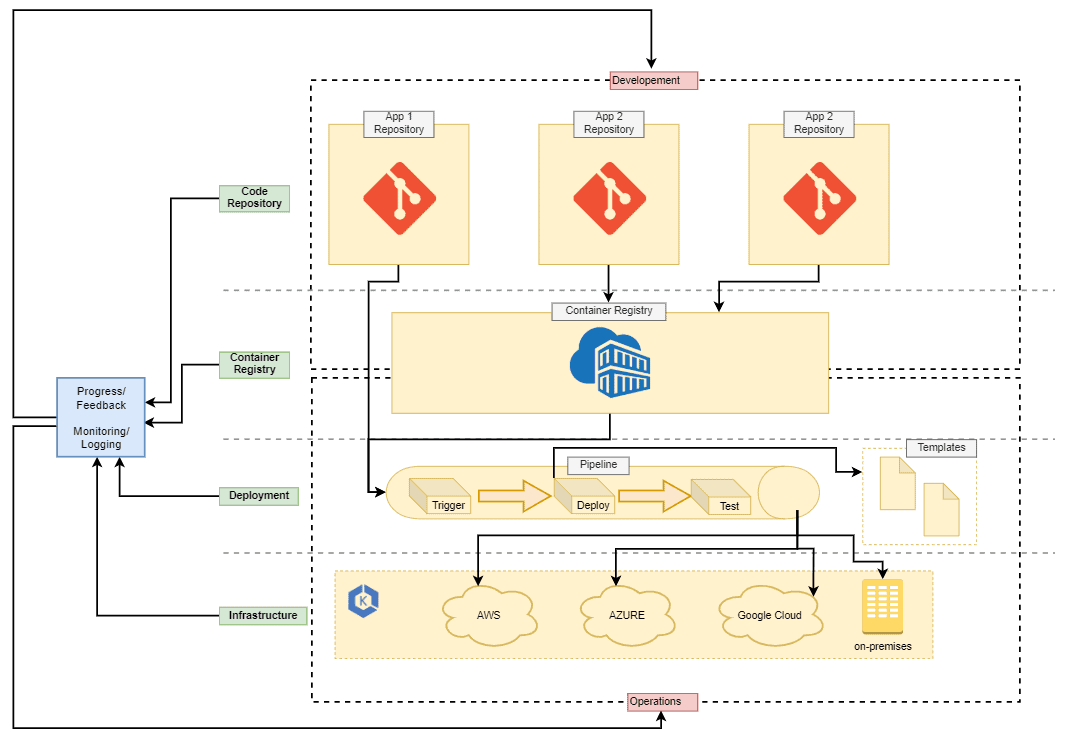
In this diagram, we see four infrastructure levels of deployment: Code Repository, Container Registry, Deployment, and Infrastructure. If a developer needs to deploy an application or create a new environment for their project, they should not have to navigate to the Deployment or Infrastructure layer. Instead, Operations should provide interfaces in the form of code repositories that allow a developer to work within their environment. Consequently, Operations will act as the administrator for the deeper deployment layers, layout rules, and process automation using their chosen deployment tools and pipelines. However, both Development and Operations should still be familiar with the entire deployment workflow and have access to all tools.
Automations at every level
Automations extend across all levels of the infrastructure. This creates a well-maintained and carefully planned pipeline to securely build, test, and deploy applications. As a result, during every deployment, Development and Operations are able to track everything happening in production and can also access aggregated information through monitoring, logging, and feedback loops.
Containers for all applications
For this entire concept to work, all applications must be containerized. The idea behind this concept is to standardize and automate application deployment as much as possible to accelerate development and the release of new features. Subsequently, the process is built up step by step to integrate applications gradually and replace old legacy installations.
Infrastructure
Kubernetes offers great flexibility and a growing number of integration options. These include multiple cloud providers, locations, and a variety of compute nodes, as well as internal networking. Therefore, the big picture of the infrastructure may differ from the diagram below depending on functional requirements and use cases.
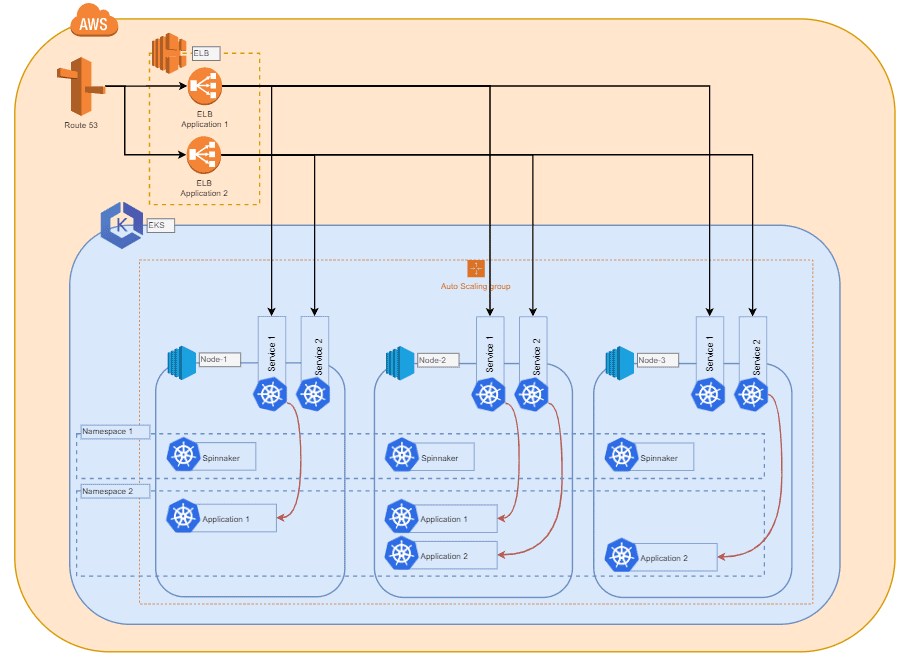
AWS Elastic Kubernetes Service (EKS)
In this example, we choose EKS as a managed service from AWS, but other managed or even self-hosted Kubernetes systems could also be a valid option.
Since Kubernetes does not handle the hardware configuration and distribution of compute nodes added to a cluster, we can cover a wide range of use cases with different requirements. We recommend choosing an instance type that you are comfortable with and that enables steady scalability for your applications. The size of this instance type may vary depending on the application you intend to deploy. A compute node should be capable of hosting multiple instances of the application you wish to deploy.
Scaling clusters
To enable horizontal scaling of the cluster within the infrastructure, we used AWS Auto Scaling Groups (referred to later as ASGs), which are capable of spawning new instances and automatically adding them to the cluster when a certain load is reached. Depending on the application, you can also implement triggers here that are based on the total RAM and/or CPU utilization of all compute nodes currently part of the cluster. This ensures that the cluster always has sufficient resources for deployments. Additionally, you should not forget to add a trigger to scale the cluster back down when the total load of the compute nodes decreases. This allows you to handle load shifts and spikes securely and cost-effectively.
Using Kubernetes tags
Since Kubernetes works extensively with tags and can distribute deployments based on compute node tags. With multiple ASGs, you can set up and scale different instance types, configurations, and tags. Kubernetes can then deploy projects or applications to hosts with specific tags.
It is also worth mentioning that the compute nodes do not need to exist in the same cloud as the master. Rather, it is possible to combine nodes from different clouds and even on-premises hardware. This requires more effort in the overall cluster network configuration.
Continue to Part 2: Deployment →