 Photo: Holger Schué / Pexels
Case Study · Energy trading
Project Portfolio Management and Resource Planning with Jira
The EEX Group needed to replace its project portfolio tool – and didn't want to maintain the same data twice. Today the portfolio runs in Jira, right where the projects already lived, complete with resource planning and approvals. Project managers now need half the time they used to.
Result
Why Portfolio Management?
The Company

Migrating and mapping our project management processes into a shared Jira-based tool helps us manage our project portfolio even more efficiently and with more agility. As a result, it makes decision-making processes and coordination within our corporate group significantly faster and more transparent.

The Solution
The project started with an evaluation of the existing project portfolio management tool and the requirements for mapping the Flight Level. The XALT TEAM then defined the requirements for the new solution based on the existing system and process configurations.
In the planning phase, the work steps for implementation in Jira were then defined and prioritized. The work packages were divided as follows:
- Set up an overview board in Jira mapping all projects with the relevant data – for example how many person-days are planned or already spent on projects, what a project's percentage progress is, and how the effort incurred is linked to individual deliverables.
- Build a hierarchy structure, so that project portfolio management as an overarching instance can sum up and map all necessary project information.
- Implement workflows and define new issue types, for example for monthly reporting and resource-based project planning.
- Create automations in Jira, so the necessary information from projects is automatically available in project portfolio management.
- Set up scripts via ScriptRunner to extend certain functions and build simple applications that can't be implemented with Jira Automations – for example hiding fields or setting write permissions on a field.
- Develop resource planning including an approval process. For this, Jira Service Management's Asset Management was used along with standard Jira functions. An asset was created for every functional team within a project. This lets the project manager assign effort from their project to an asset or role (for example the IT team, finance team, customer area team) when planning a deliverable. In a next step, the responsible manager of that team can then approve or reject the required resources.
- Testing and go-live.
Over the roughly five-month project, the XALT TEAM worked in an agile way together with EEX and ECC. Features were prioritized and worked through based on Jira Advanced Roadmaps. In daily stand-ups, progress and the respective next tasks were coordinated within a cross-functional team.
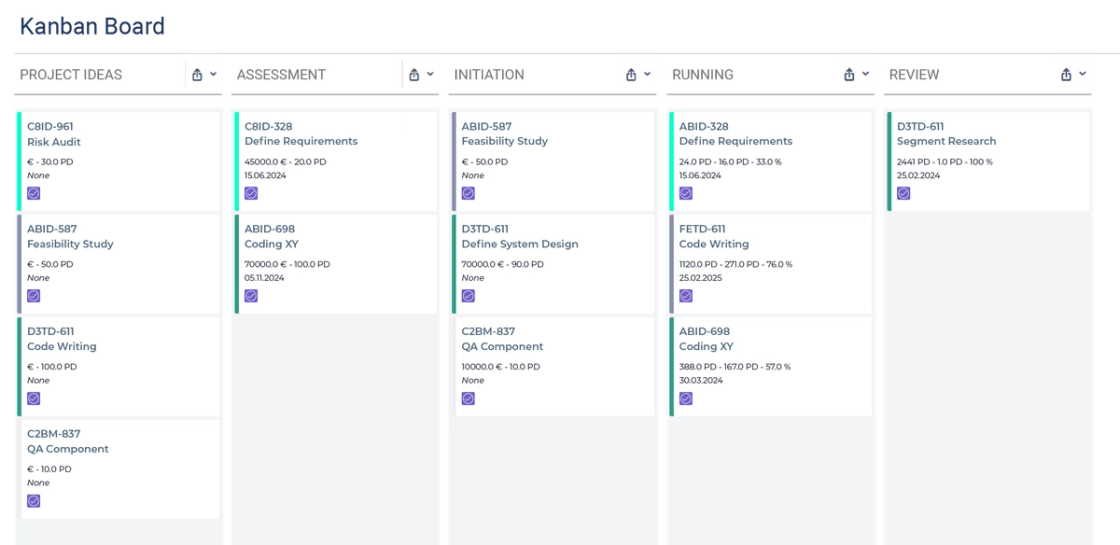
The Results
Implementing project portfolio management and project management in Jira has led to significant efficiency gains, both for users and at the management level. Acceptance and the associated use of Jira within EEX and ECC is also higher, so Jira has become a fixed part of daily work. Users' existing Jira know-how enables joint further development of the project portfolio management tool as well as coordination of work at the delivery level.
These results summarize the benefits:
Reduced workload
- Planning effort for project managers was reduced by around 50%, since no duplicate data maintenance is needed to have the data relevant to portfolio management readily available.
- Using automated workflows reduces manual effort and makes it less error-prone.
- Jira enables evaluation of portfolio management data directly in the tool using dashboards, reducing effort spent on manually created presentations.
More transparency and confidence for decision-makers
- Display of the up-to-date project status on the project portfolio management overview board.
- Integrating all information into the same system minimizes the risk of manual errors and improves data quality.
- The ability to coordinate cross-team project work, down to linking resulting tasks to a single team member.
Efficient resource planning based on current data
The resource planning in Jira, developed by the XALT TEAM according to customer requirements, offers
- a clear overview of the roles within a team assigned to certain project tasks, and
- capturing planned effort per role.
More Success Stories
Energy trading
Dynamic Redesign of the EEX Intranet with Refined
EEX Group needed a new intranet in two and a half weeks – the old one was still running on a different platform. With Confluence and Refined, it became a work platform for around 700 employees: a mega menu instead of searching, its own corporate design, and content maintained by the teams themselves.
Read case study →Financial services
Purchase Order Automation and Digitalization for Our Client in the Financial Sector
Every order traveled on paper through internal mail, department by department – taking so long that quotes lost their validity along the way. Then came Covid and remote work. Today the order process runs in Jira, with digital signatures and automatic approvals: half as long as before.
Read case study →Mechanical engineering
Atlassian Cloud Migration of Jira, Confluence and Bitbucket
FATH ran Jira, Confluence and Bitbucket itself – and paid for every outage: troubleshooting, recovery, staff time. All three systems moved to the Atlassian Cloud in one go, without disrupting daily work. Downtime fell from twelve hours a year to almost none, and operating costs dropped by 80 percent.
Read case study →better call XALT
We help your team achieve greatness in every aspect
Want more information or a tailor-made solution? We help you get the best out of your company. Feel free to contact us by phone, email, or visit us at our office.