An article by Richard Richter | DevOps Agile Coach at XALT
Searching for information in the working day can quickly become a time trap, especially in the service sector. Studies show that the average employee spends up to two hours a day gathering information.
That is around 25% of working time in a 40-hour week that cannot be used productively. In addition, employees spend an average of 13 minutes searching before asking colleagues for help. This adds up to almost a full working day per week of lost time.
Do these problems with documentation sound familiar?
- Missing or scattered documentation: Is there any documentation at all, and is it stored in a central knowledge base?
- Outdated content: Are existing manuals and runbooks currently maintained?
- Accessibility: Is everything in one place or scattered across emails, network drives, and departmental silos?
- Documentation aversion: Creating documentation is rarely a popular task. As a result, the quality of the texts often suffers, and readers find it difficult to follow the content.
- This also raises the question: Who actually reads the entire documentation?
At XALT, we have found an answer to this. In this article, we would like to show how we use the AI-powered chatbot Rovo to help us with these challenges.
How Atlassian Rovo helps as an AI solution in creating & searching documentation
With Rovo, the AI-powered chatbot from Atlassian, which is connected to our Confluence system, we have gained a virtual employee who supports us in efficiently searching for information and many internal processes. Our internal Rovo Ambassadors promote the documentation of all processes in Confluence.
In this way, we convert implicit knowledge into explicit knowledge; a foundation for efficient documentation with AI. Because, like any employee, Rovo can only work as effectively as the information provided to it.
The following use cases of Rovo are standard practice when searching for and creating our technical documentation.
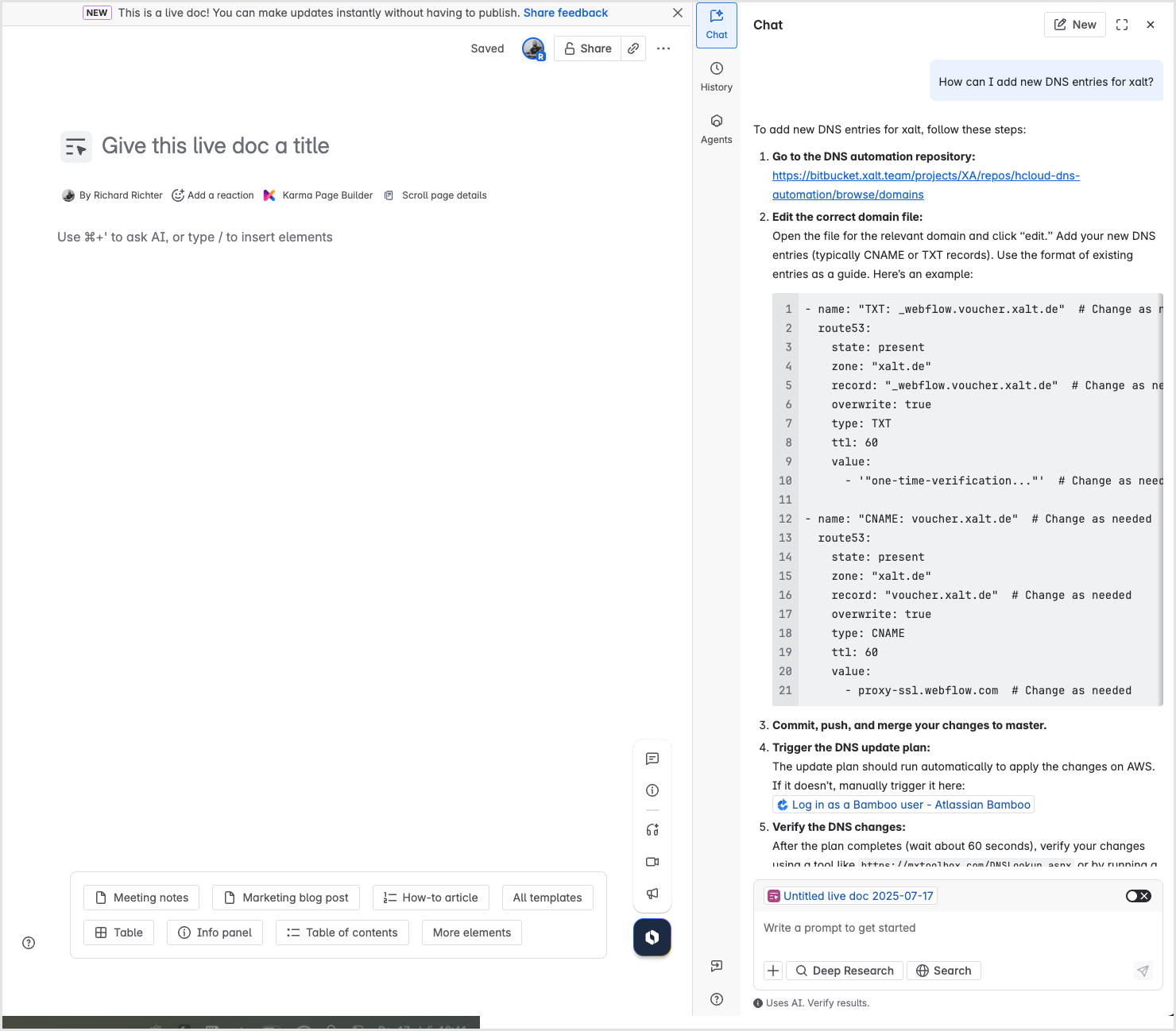
Automated search for information
“Can you quickly create a new DNS entry?” was the question directed at our new colleague. A short prompt to Rovo is enough, and the AI provides targeted answers. For example, Rovo immediately recognizes, based on the assigned employee role (Consulting, Marketing, etc.), what type of information is being sought (more technical or sales-oriented?) and displays it. This reduces the number of search results and leads the employee to the goal faster.
Pro tip: You can also restrict access to specific Confluence areas or specific Jira Service Management projects by configuring your own chatbot. This keeps it focused during the search and delivers more precise results.
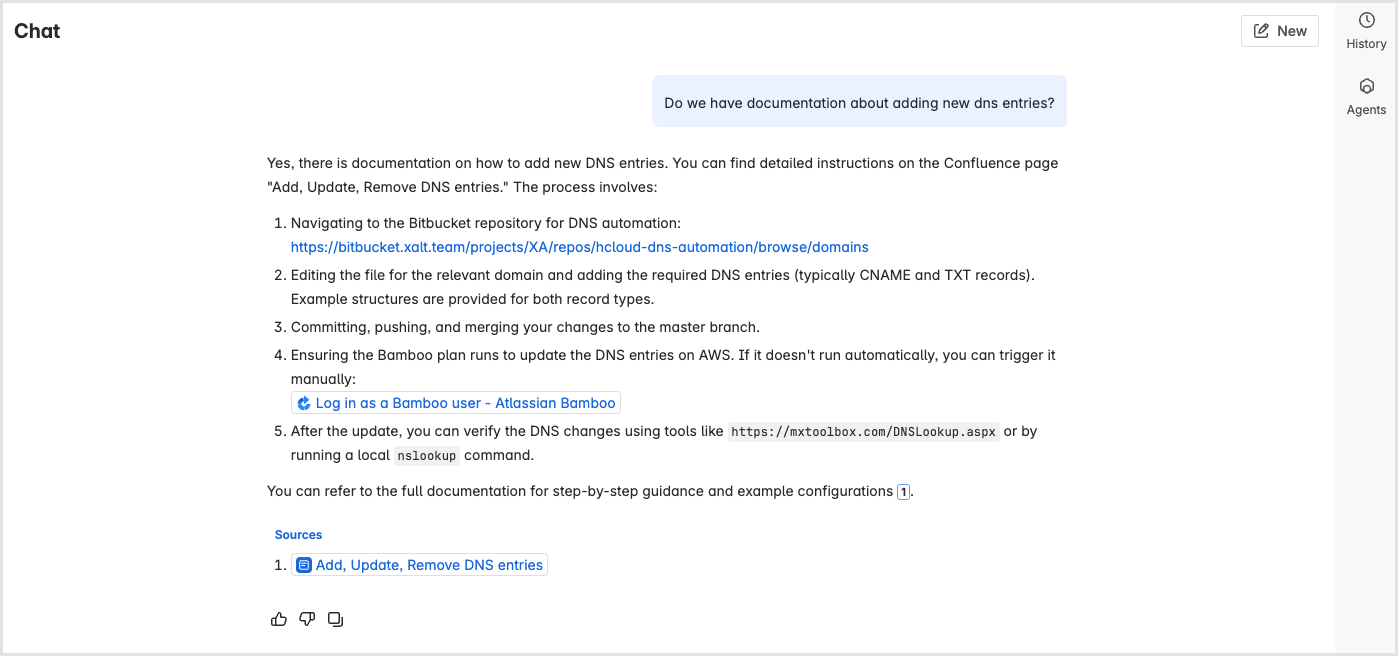
“As a DevOps engineer, I want to deploy, not hunt for runbooks like a detective. Before we used Rovo, I definitely lost 10 to 15 minutes per ticket on context switching. Now I type a question into Confluence, get the relevant process in seconds, including code snippets and pipelines. This reduces frustration, increases quality, and makes documentation finally a living system rather than a mandatory exercise.”
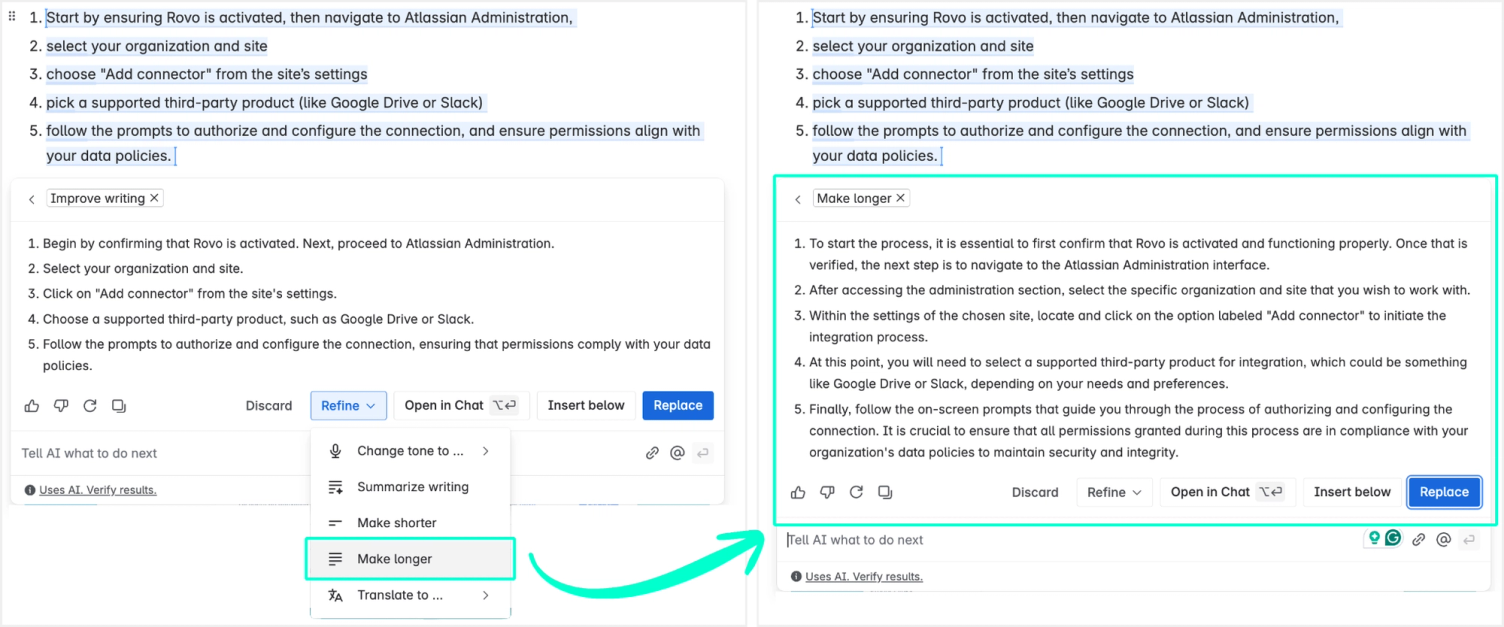
Converting bullet points into reader-friendly texts
Writing documentation in such a way that new colleagues understand the context is a tedious and challenging task for many. Often, one makes a few bullet points alongside, which another person can only find it difficult to put into context.
Thanks to Atlassian Intelligence, any simple list can be transformed into a structured, easy-to-read post with a single click. A win-win situation for documentation creators and readers.
Supplementing incomplete content
Even with unprocessed texts, Rovo can already help and attempts to provide assistance using all available information, ensuring that users are informed in a targeted manner.
By removing barriers to creating high-quality, understandable technical documentation and continuously expanding our knowledge base, we benefit on a daily basis. Our resources can be used efficiently, and non-value-adding activities are reduced.
ROI and benchmarks: Why AI-assisted documentation pays off
Atlassian's own research demonstrates the enormous value of consistent process documentation.
- Only 4% of all companies consistently document their processes.
- Poor knowledge transfer costs large enterprises up to $47 million per year
- 80% of employees feel, according to a Gartner survey, that they are not sufficiently empowered for their current and future roles – structured documentation and AI support promote engagement and competence.
Next step: Sustainable documentation with AI power
When we consider the 25% of working time wasted on information retrieval, it becomes clear that efficiency improvements in this area are possible – and in almost every process, once it has been documented in Confluence. Documentation also opens up new opportunities for optimization, as processes become more visible and can be standardized.
With Atlassian Rovo as your new, multi-talented, virtual employee, you achieve:
- Higher efficiency through faster information retrieval
- Long-term quality assurance of your documentation through AI-assisted text creation and optimization
- Scalable onboarding and smooth process flows
Start today with efficient documentation powered by Atlassian Rovo and AI!
Want to know what else Rovo can do? In this video you'll find an overview of the current capabilities of Atlassian's AI-powered chat agent.