 Photo: Thirdman / Pexels
Case Study
Automated Project Access with JSM Self-Service
How our customer achieved a 5x speedup through automated project access with a JSM self-service portal, cutting administrative effort by 60 percent.
The Starting Situation
Companies need to bring multiple teams into a shared Jira instance, but face an important challenge in doing so: it must be ensured that each team's projects stay private and inaccessible to other teams. In addition, teams need the ability to manage their own access to projects without being granted full administrator rights for Jira.
The Challenge
By automating processes such as automated project access provisioning and user group assignment, tasks that used to be reserved for administrators can now be handled easily through a secure self-service system. This integration made the access provisioning process up to 5 times faster and significantly improved operational efficiency.
The Requirements
To solve this, a self-service portal was implemented with Jira Service Management (JSM). This system had to meet the following requirements:
- Enabling employees to independently manage project access
- Maintaining strict privacy controls and project security
- Reducing the administrative burden on administrators
- Speeding up the process of granting access and setting up projects
- Improving operational efficiency and team autonomy
The Solution
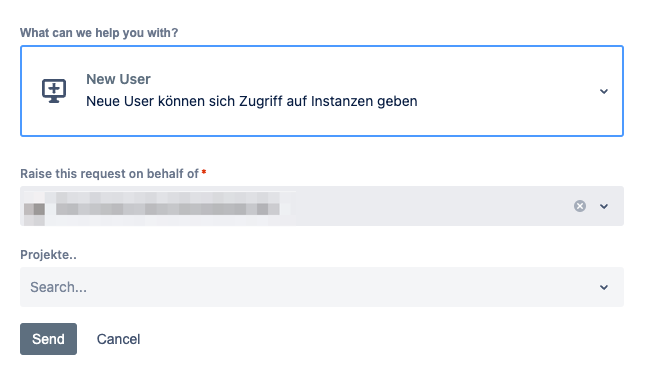
With the Jira Service Management self-service portal and automated project access provisioning, your team can take control of its project involvement – while maintaining strict access permissions. This means employees can gain access to projects they're authorized for, without an administrator having to step in.
The self-service portal uses Jira Service Management and automation to streamline user access while maintaining strict security controls.
How It Works
Project creation.
When a new project is created, automations are triggered to ensure secure access and management:
- Automatic privacy settings: access to the project is immediately set to private, so only authorized team members can view or participate in the project.
- Group creation: a group with the same name as the project is automatically generated, managing user access for that specific project.
- Asset creation: the project is registered as an asset in the system, so it's easily accessible in the self-service portal for future use.
Controlled user access.
When users need access to a project, the self-service portal securely automates the process:
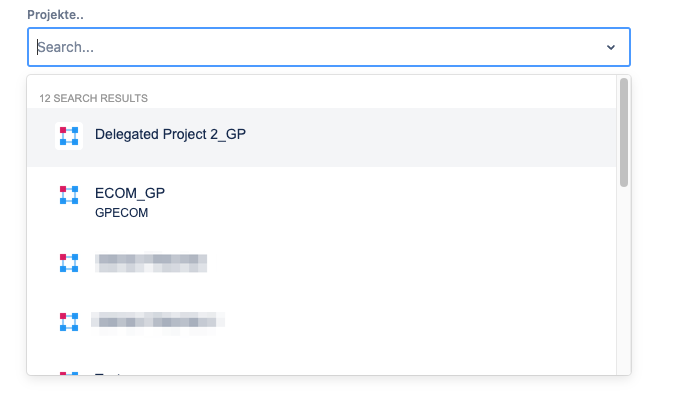
- Restricted project selection: users are shown a list containing only the projects they're allowed to access.
- Automated user assignment: once a user selects a project, they're automatically added to the right group via Jira's REST API, without an administrator needing to step in. The system guarantees that users only get access to approved projects.
Automated project removal.
When a project is no longer active, automations take care of cleanup:
- Removal from the self-service portal: the project's asset is deleted, so it no longer appears in the portal and access is fully revoked.
Self-Service for Business Teams
Automate recurring tasks and boost your teams' productivity by up to 50 percent.
The Results
Seamless project access without administrator involvement.
Employees can independently manage their project access without relying on administrators, ensuring smooth workflows while security stays intact. This autonomy has led to a 50 percent reduction in support tickets related to access requests, letting IT teams focus on more important tasks.
Strict project security and data protection.
The system ensures that each team can only access the projects it's authorized for. Unauthorized access is automatically prevented, even in a shared Jira environment, ensuring that sensitive information stays protected.
Minimized administrative effort.
Administrators can focus on more strategic tasks by automating repetitive tasks like project access and group management. This reduces their administrative effort by 60 percent and speeds up the access provisioning process by up to 5 times.
Faster project rollout.
Automations streamline the setup of new projects and ensure teams can start collaborating without waiting for manual configurations. This reduces delays, speeds up onboarding, and improves overall productivity.
Conclusion
By implementing the self-service portal and Jira Service Management's automation features, organizations can streamline their project access provisioning, reduce administrative effort, and improve team autonomy – all while maintaining robust security measures. This solution boosts both efficiency and security, making it easier for teams to collaborate effectively without delays caused by manual processes.
Self-Service for Business Teams
Automate recurring tasks and boost your teams' productivity by up to 50 percent.