 Photo: cottonbro studio / Pexels
Case Study
Automated Permission Management for Confluence Spaces and Jira with an IAM Self-Service
Efficient permission management for 60,000 Confluence users: automation and self-service boost productivity and transparency in Confluence.
The Starting Situation
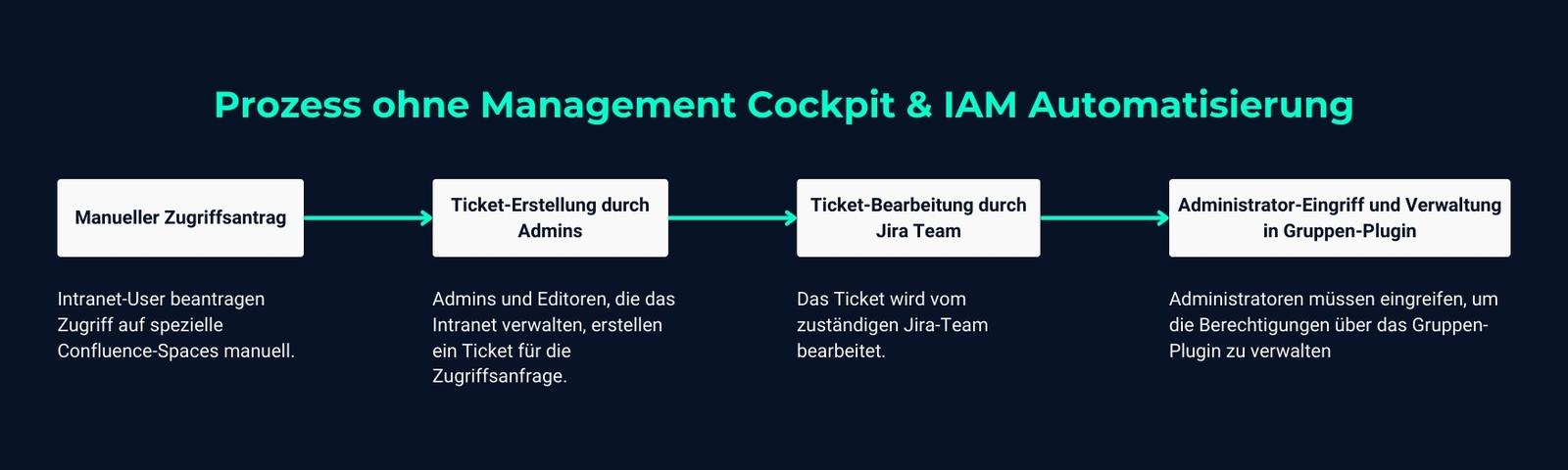
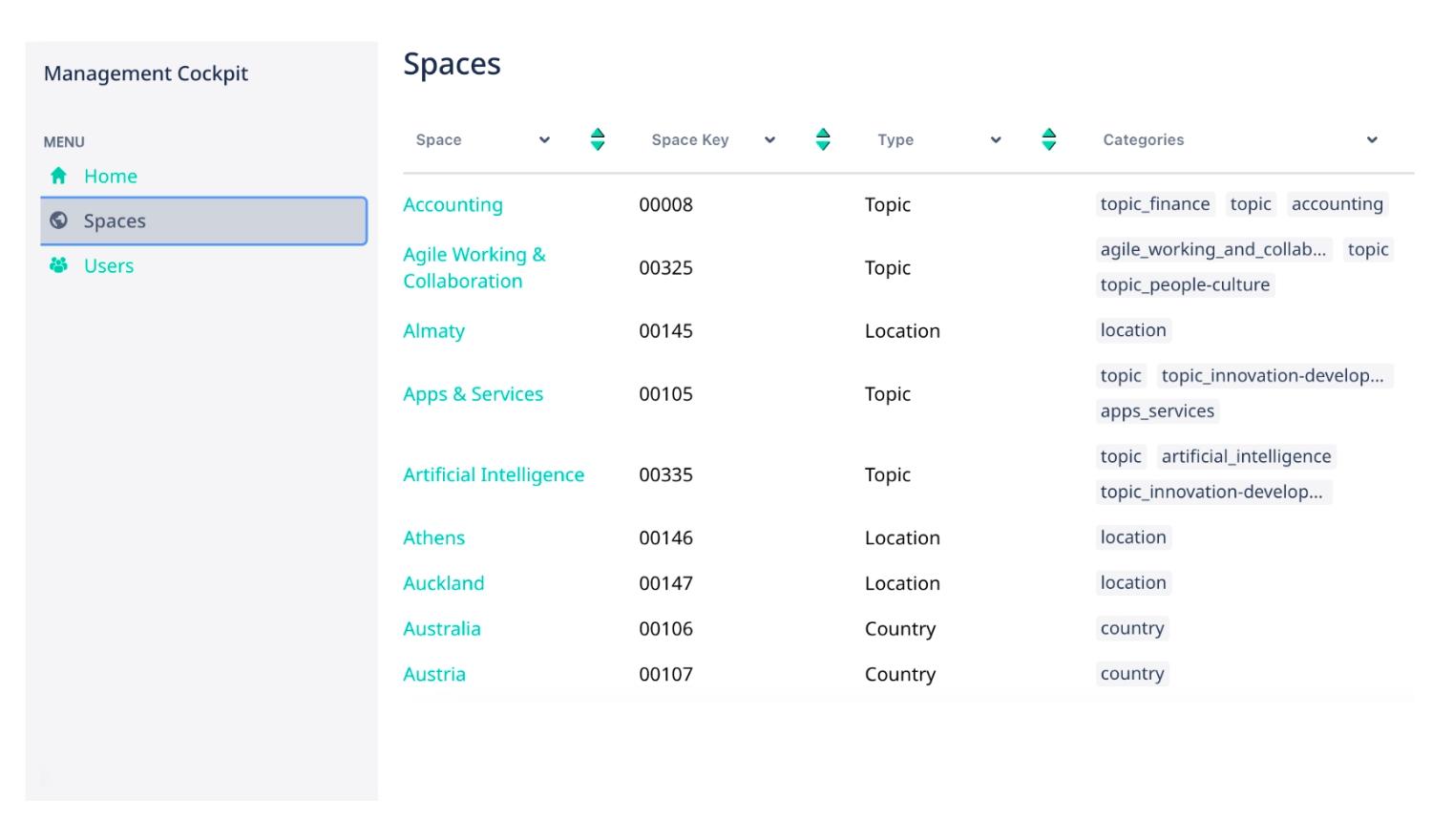
Assigning permissions in Confluence was a time-consuming and inefficient process in many of our customer's IT projects – a customer that runs a digital workplace (based on Confluence) for 60,000 employees. Intranet users who needed access to specific Confluence spaces requested that access manually. Admins and editors who manage the intranet had trouble keeping track of who manages and maintains which spaces. In practice, this meant they had to create a ticket, which was then handled by the responsible Jira team. This process often took several days, since administrators had to step in to manage permissions via a purpose-built group plugin. To solve this problem, the Management Cockpit offers a central space view showing all editors and admins of a space.
There was also no way to add notes, status or ratings to the content of the spaces, which was important for administrators to ensure the quality of content published by editors. The Management Cockpit adds a comment feature that lets any authorized user leave comments or notes on a space.
Admins also wanted an overview of user activity in the intranet as well as the spaces they're a member of. Since Confluence often only used groups as a reference to figure out which part of a space someone manages, this was problematic. The Management Cockpit now offers a personal view for users, showing which spaces and roles they're active in.
The Challenge
The manual approach came with several drawbacks:
- Long wait times: the approval process for access to Confluence spaces often took days, causing significant project delays.
- Inefficient permission management: creating tickets and the subsequent approvals caused a high administrative burden for the Jira teams.
- Lack of transparency: users couldn't track who had access to which spaces or how far their request had progressed in the approval process. This led to frustration and dissatisfaction among teams.
The lack of automation hampered workflow and placed an unnecessary burden on IT teams.
The Requirements
To address these challenges, the customer set the following requirements for the solution:
- Reducing wait times: the process should be automated so access requests can be handled within seconds instead of several days.
- Relieving IT teams: we wanted to minimize the manual effort for handling access requests, to relieve the IT teams.
- Improved transparency and traceability: the solution should offer a central platform where everyone involved can view the status of their requests.
- Self-service options: project teams should be able to submit their requests independently, without relying on manual processing.
The Solution
To solve these problems, we developed and integrated the Management Cockpit for our customer – a solution that provides self-service and automation for identity and access management (IAM) of Confluence spaces. The new solution lets users independently request permissions for specific spaces, without having to create a ticket. Instead, the process now runs through a self-service portal that offers an overview of all available spaces and roles. The user fills out the form, and a ticket is automatically created in Jira.
Key Features of the Management Cockpit
- Self-service portal: users submit requests for access to Confluence spaces through an intuitive portal. They choose from a predefined list of spaces and roles.
- Automated approval process: once a request is submitted, the system automatically routes it for approval. As soon as approval is granted, the automation grants access within seconds.
- Integration and automation: Groovy scripts and integrations with GitHub automate the changes in Confluence. This fully automates what used to be a manual process.
- Clear overview: the Management Cockpit provides an overview of all requests, associated roles and their status, so everyone involved stays informed.
- Validation against duplicate requests: the system automatically checks whether the user already has access, to avoid duplicate submissions and confusion.
With this solution, we seamlessly transformed the entire permission management process into a simple, fast self-service process.

Permission Management for Jira & Confluence with XALT Advanced Access Management
Maximize your teams' efficiency by automating your permission management.
The Results
Implementing the Management Cockpit led to significant improvements and benefits for everyone involved:
- Reduced processing time to as little as 18 seconds: the process for granting permissions in Confluence went from several days down to 18 seconds. The Management Cockpit drastically shortened wait times for users, significantly boosting project teams' productivity.
- Relief for IT teams: the Jira team, previously responsible for handling tickets, was significantly relieved. Thanks to automation, IT staff can focus on more important tasks instead of manually managing permissions.
- Increased user satisfaction: the self-service approach lets users submit their own requests and track their status. This led to greater satisfaction and a more positive user experience.
- Minimized sources of error: automation and the elimination of manual intervention reduced potential sources of error. The system ensures only authorized requests go through and prevents duplicate requests.
- Better traceability and transparency: with the Management Cockpit, users now have a central place to view the status of their requests and get an overview of all access permissions. This significantly improved the transparency of the entire access process.
- Robust error handling: during implementation, initial issues arose such as duplicate request entries or difficulties integrating with GitHub. We resolved these challenges through validating code and additional permission approvals for technical users, further increasing the solution's reliability.
Conclusion
The Management Cockpit for Confluence revolutionized the previously manual permission management in the Confluence digital workplace or intranet. By introducing automation and self-service options, project teams work faster, IT teams are relieved, and the whole process became significantly more efficient. The results speak for themselves: a reduction in processing time from days to seconds, fewer errors, more control for users, and a massive boost in productivity.
For intranet users, admins and editors who manage access and need an overview of it, as well as for the Jira team managing the group plugin, the Management Cockpit is a no-brainer. It improves efficiency and transparency and is a valuable solution for any company that uses Confluence and wants to optimize the management of access permissions.
It's especially worth highlighting that this self-service integrates excellently into already existing self-service portals, or offers an entry point into the world of self-service. At the same time, the “put-user-in-group” approach also allows new use cases to be implemented, such as when developers need access to Jira projects. This flexibility opens up additional possibilities and application areas that further increase the value of the Management Cockpit.
Maximize Your Teams' Efficiency by Automating Your Permission Management
Automate your IAM with Jira and Confluence and digitally involve your employees, customers, service providers and partners – for seamless collaboration.