
Are you currently considering digitising and automating your processes in the sales team? But are you unsure why or how you should approach it? Then ask yourself whether this scenario here sounds familiar: The digitisation and automation of processes with Jira could be the key to more efficient workflows. The digitisation and automation of processes with Jira offers a wide range of benefits that can increase your efficiency.
Someone finds an interesting product online, has a question regarding setup or costs, and sends an inquiry to the company. It is all too often the case that no answer follows to the question.
In today's time, the digitisation and automation of processes with Jira is essential to remain competitive.
The digitisation and automation of processes with Jira helps you keep track of all inquiries.
Through the digitisation and automation of processes with Jira, we can significantly increase the efficiency of our team.
We have defined the digitisation and automation of processes with Jira as a goal to optimise our customer service.
It seems relatively simple to send a customer or prospect an answer to their inquiry. However, it frequently happens, especially in SMEs, that inquiries are overlooked and lost.
In the following, you will learn how we implemented the digitalisation and automation of processes with Jira in our sales process
A successful project is based on the digitalisation and automation of processes with Jira.
Another important aspect is the digitalisation and automation of processes with Jira, which enables teams to respond to customer enquiries more quickly.
The digitalisation and automation of processes with Jira is not just an improvement, but a necessity in today's business world.
The digitalisation and automation of processes with Jira enables us to respond to enquiries quickly and handle them effectively.
Through the digitalisation and automation of processes with Jira, we can significantly increase efficiency within our team.
Current situation before automation
Our team also struggled with exactly this challenge.
Enquiries about our services and products accumulate across many different channels. These include, among others, contact requests via our homepage, social media, or by phone.
Following an extensive rebranding and the search engine optimisation of our homepage in early 2021, these enquiries and interest in our services increased rapidly. Although we had established internal responsibilities to create and manage an overview of incoming enquiries, our channels became overloaded due to the volume of questions, causing individual customer enquiries to be overlooked and often only answered weeks later.
A key advantage of the digitalisation and automation of processes with Jira is the minimisation of manual tasks.
With the digitalisation and automation of processes with Jira, we make our internal workflows more efficient and transparent.
Find out why the digitalisation and automation of processes with Jira is important for your business here: To the article.
Define goals together
These goals support the digitalisation and automation of processes with Jira at every step of the sales process.
As a team, we are convinced that we should offer interested contacts and potential customers the best possible service. Therefore, we decided to fundamentally restructure, improve, and implement our process using Jira.
To implement our project, we first formulated three fundamental goals that we wanted to achieve with the Jira project:
- The digitalisation and automation of processes with Jira enables the entire process to be visualised through a Kanban board.
- Setting a deadline of 24 hours for initial contact with a new contact or new request. For this purpose, we set an SLA of < 24 hours in the Jira project.
- Using automations in Jira to reduce manual workload and automate certain intermediate steps. As we currently do not have our own sales department, this is particularly important for us.
Moving to a digital sales process with Jira
To achieve these goals, we needed an established, digitised sales process that can be easily automated. Jira offers numerous advantages for implementing sales processes. Jira allows all content to be integrated into one platform and one board. Teams can continue to work efficiently, as all necessary customer information and information about the communication that has taken place are stored in the system and can be easily accessed.
We would like to explain in this article how the specific implementation with Jira as the basis for sales processes looks and how we use Jira and workflows for our own sales process.
With the digitalisation and automation of processes with Jira, we can improve communication and shorten processing times.
The digitalisation and automation of processes with Jira makes it easier to keep track of all requests.
Jira is a versatile project management tool for departments such as finance, marketing, human resources, and sales. Sales managers can use Jira to channel incoming leads, send automatic responses, track processes, or manage quotes.
In Jira, tasks and processes are managed through workflows. A workflow represents the steps of your process and the status that a task (here the request) goes through.
Managing existing customer and new customer requests becomes noticeably easier when you visualise your sales workflow and respond directly to questions about your products or services.
Learn more about Jira and our consulting services
Design of our sales process
The digitalisation and automation of processes with Jira enables manual tasks to be minimised and work to be done more efficiently.
We rely on the digitalisation and automation of processes with Jira to ensure seamless communication with our customers.
At the beginning of our project, we created a conceptual workflow and walked through the individual steps in the process.
The first steps in setting up the workflow were:
- Brainstorming about the different types of requests.
- Collecting the various channels.
- Detailed discussion, planning and description of each individual step in our workflow for new requests.
To create a workflow that meets our requirements, IT and business development experts from our company pooled their content and knowledge. The result is a flexible workflow with individual processes, as well as intermediate steps and partially automated processes.
Even with the most meticulous planning, it will happen that further adjustments need to be made at a later point in time or additional optimization potential is discovered. This is where a major advantage of Jira comes into play: Changing workflows and automations is uncomplicated and can be done quickly, without having to adjust the entire project.
Creating a Jira project
Once your own workflow has been defined, it is time to integrate it into Jira. To do this, a new project must first be created.
- To do this, click Projects > View all projects
- Then click Create project in the top right corner
- Select Basic project* > Enter the name and key of the project
An essential part of digitizing and automating processes with Jira is the continuous evaluation of our progress.
We recommend using the Basic Project template, as it offers the best options for tracking, prioritizing and resolving requests.
Creating the Kanban board in Jira
- Next, click Boards > View all boards
- And then top right on Create board
- You select Kanban board > Board Select from existing project
- Enter the name and select the project that was just created
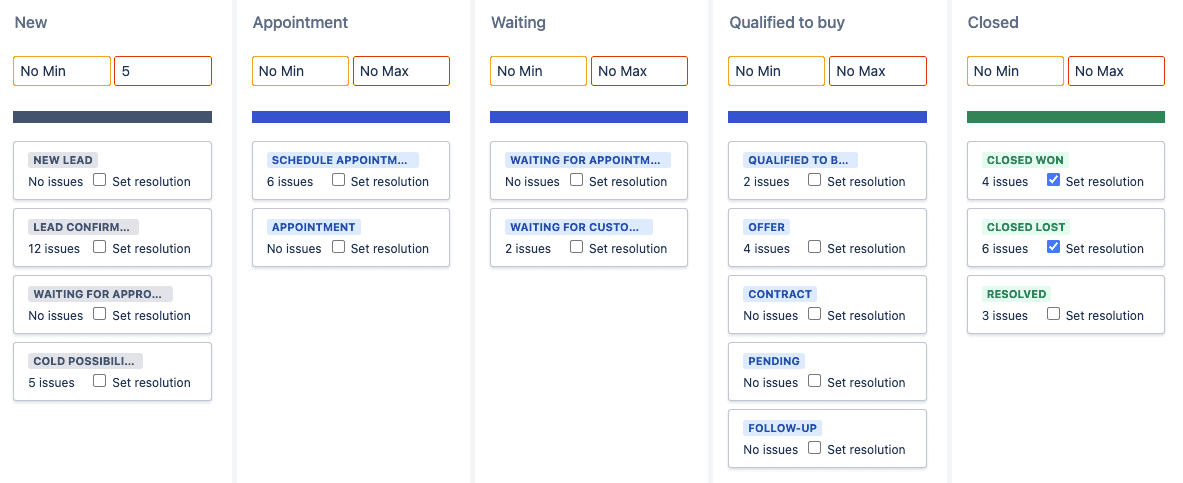
After the board and the project have been created, click the Project settings button to configure settings such as automation, workflows, SLAs, as well as users and roles.
Digitalisation and automation in 6 steps
The following tasks and settings are required after the creation of the project and the Kanban board:
The benefits of digitalising and automating processes with Jira are diverse and strengthen our competitive position.
- Automatic conversion of requests into tickets via integration of various channels
- Creation of a workflow and the individual statuses
- Definition of SLAs
- Creation of automations for various steps in the process
- Setup of the Kanban board with columns and swimlanes
- Definition of responsibilities and notifications
The following gives a rough insight into how we have implemented our sales concept in Jira in the form of the workflow and the automations. Due to the scope, the following points only provide a small insight into the project. If interested, we would be happy to discuss the project in detail in a separate conversation.
1. Automatic conversion of requests into tickets
Initially, it must be ensured that all incoming emails with requests are automatically converted into the system. To achieve this, Jira should be integrated into the email system. This setting can be changed under Project settings > Email request Make sure that you…
- have the permission to manage the project.
- public sign-up or adding customers for your project is enabled to ensure that you receive new requests.
- have enabled your email channel so that you can use your sales email address to create new requests.
- have set up a suitable request type and selected it, so that requests created from emails are assigned this request type.
After setup, incoming requests are now transferred and automatically converted into tickets. All requests are thus found on a single board, giving the team the advantage of being able to work on these requests together without having to keep an eye on the various inboxes.
Overall, the digitalisation and automation of processes with Jira leads to a significant improvement in our efficiency.
2. Creating a workflow and the individual statuses
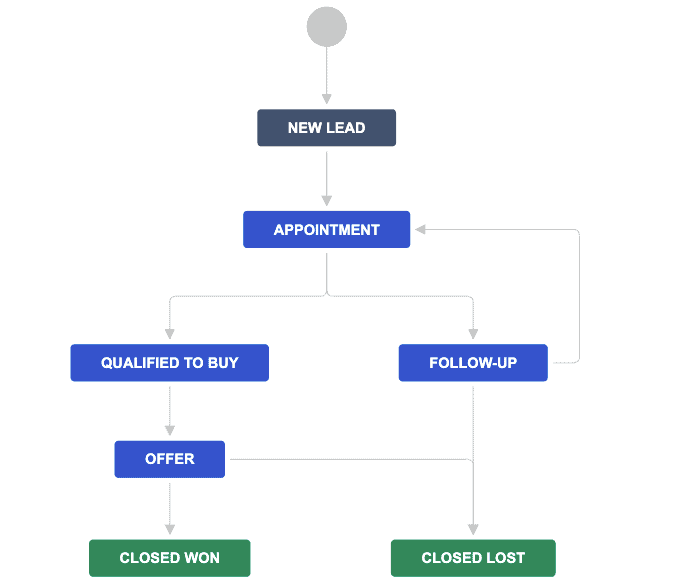
Furthermore, a workflow must be created. For a flexible workflow, it is important to select a Software Simplified Workflow Scheme and establish a network between the individual statuses, so that the status of each ticket in this workflow can be transitioned to any other status. This creates high flexibility and ease of use. Using the Simplified Workflow, the contents of the Kanban board (including columns and statuses) can be changed at any time.
The workflow for the sales process can then be adapted to an individual, personalised workflow according to the requirements gathered during the concept phase. A sales workflow could look as follows:
The digitalisation and automation of processes with Jira is a key factor for our business success.
3. Defining SLAs
Good customer service ensures that customers stay with you. An important component of good customer service is responsiveness. With Jira, you can achieve a good response time and keep your sales team up to date by setting SLAs for how quickly requests should be processed. We set the SLA in our workflow to 24 hours. If the remaining time of the SLA for reviewing a request is less than 60 minutes, our assigned team members are notified.
SLAs can track the following properties, for example:
- Responding to all requests within X hours.
- Completing high-priority requests within X hours.
- Warning about an SLA expiring X minutes before the deadline.
4. Creating automations for various steps in the process
In addition to SLAs, additional automations can be created. You can add “When” triggers, “If” conditions, and “Then” actions. These parameters define the process and create the automation. For the initial meeting with a new contact, for example, we implemented the first step of our sales process with automations. This means that a new contact receives an automated email in advance confirming that we have received their inquiry and are addressing their request. The status of the inquiry is thereby changed from New to Confirmed.
Case study: a digitised sales process with Jira
Further automation options
As the next step, we want to schedule an initial meeting with the prospect to discuss their request and present our services and way of working. For this, a specific assignee from the team must be assigned to the ticket. Additionally, the ticket must be given either the label lead-de or lead-en.
If, for example, User XY is set as the assignee and the label lead-en is applied to an inquiry, the contact receives an automatic email from User XY containing their meeting link in English. To trigger this automation, the ticket only needs to be dragged to the Schedule Appointment status field on the Kanban board.
Example: Automation Rule
These measures for the digitalization and automation of processes with Jira are crucial for the success of our sales team.
WHEN: status changed > IF: issue matches status = Schedule appointment AND assignee = User XY AND label = lead-en > THEN: send email = Template “Answering contact” AND transition issue = Waiting for appointment AND add comment = ‘XALT Bot: Invitation to phone conversation sent’.
Further automations include a simple acknowledgment of receipt, a reminder to the customer if no response is received within 72 hours, and an update of the ticket status to Appointment when the customer has registered for a time slot via the meeting link.
Conclusion - Jira, automation, and reporting
In our automated Jira project, we can now respond to and process inquiries simply and flexibly. Thanks to our SLAs and the consolidation of all inquiries into a single project and Kanban board, no inquiries are lost, and we can provide good service to all contacts. Through tracking and document management in Jira, it is also possible to easily provide all stakeholders with information about the customer, their interests, and relevant documents such as quotes or contracts.
An additional benefit of the implementation is Jira's extensive reporting function, which gives us insight into how many inquiries have arrived in the board and how their process flow has proceeded.
Digitalization and automation of processes with Jira
“Everything that can be digitized will be digitized.” – Carly Fiorina, CEO of Hewlett-Packard
Our best practices
Our sales process works entirely without an extensive sales team. There are two project owners whose task is to process the existing inquiries, ensuring that none of them are overlooked. The workflow is designed to be flexible and open, so that consultants who wish to handle an inquiry themselves have the opportunity to do so in accordance with the workflow. For the various steps in the workflow, from initial contact to quote creation, internal contacts with the necessary knowledge are also listed, who can be contacted in the event of a blocker.
In our internal projects, we always follow the philosophy of creating a holistic system based on input from various stakeholders, which in turn generates output and value in different directions, such as customer service or marketing. This is precisely why we have kept our workflow flexible and merged various departments, such as Marketing and Sales, for the project. This ensures that different teams and groups within your company collaborate, thereby creating synergy effects and team spirit.
Our marketing managers therefore also have access to the project and the Kanban board, allowing them to view the progress of a contact in our sales funnel. The marketing team can accordingly plan marketing activities and provide contacts with further informative and relevant information regarding their inquiry.
A clear advantage is the reduction of errors through the digitalisation and automation of processes with Jira.
Vision and Outlook
Thinking one step further, you could also involve operations staff, and when the status reaches the Offer column, an email containing all necessary content is automatically sent to Operations.
The created offer is sent, and the status on the Kanban board is moved to the Closed Won or Closed Lost column, depending on whether the offer is accepted or rejected. This triggers an SLA again, which, for example, sends an internal reminder to Operations to check payment receipts after 14 days.
Case study: a digitised sales process with Jira
The digitalisation and automation of processes with Jira increases efficiency and reduces error sources.